
If you’re learning to type in Hindi with the Mangal Font Remington Gail Keyboard, you’ve probably encountered the mysterious Halant ($्$) key. This little diagonal stroke is often the biggest hurdle for new typists, but it’s also the single most powerful key for achieving 100% accuracy in Hindi.
Without mastering the Halant, your $क$ will stay $क$, and you’ll never achieve the elegant combined letters like $क्त, स्म,$ or $द्य$. This guide will demystify the Halant, turn confusing characters into simple keystrokes, and drastically improve your Mangal Font Hindi typing accuracy.
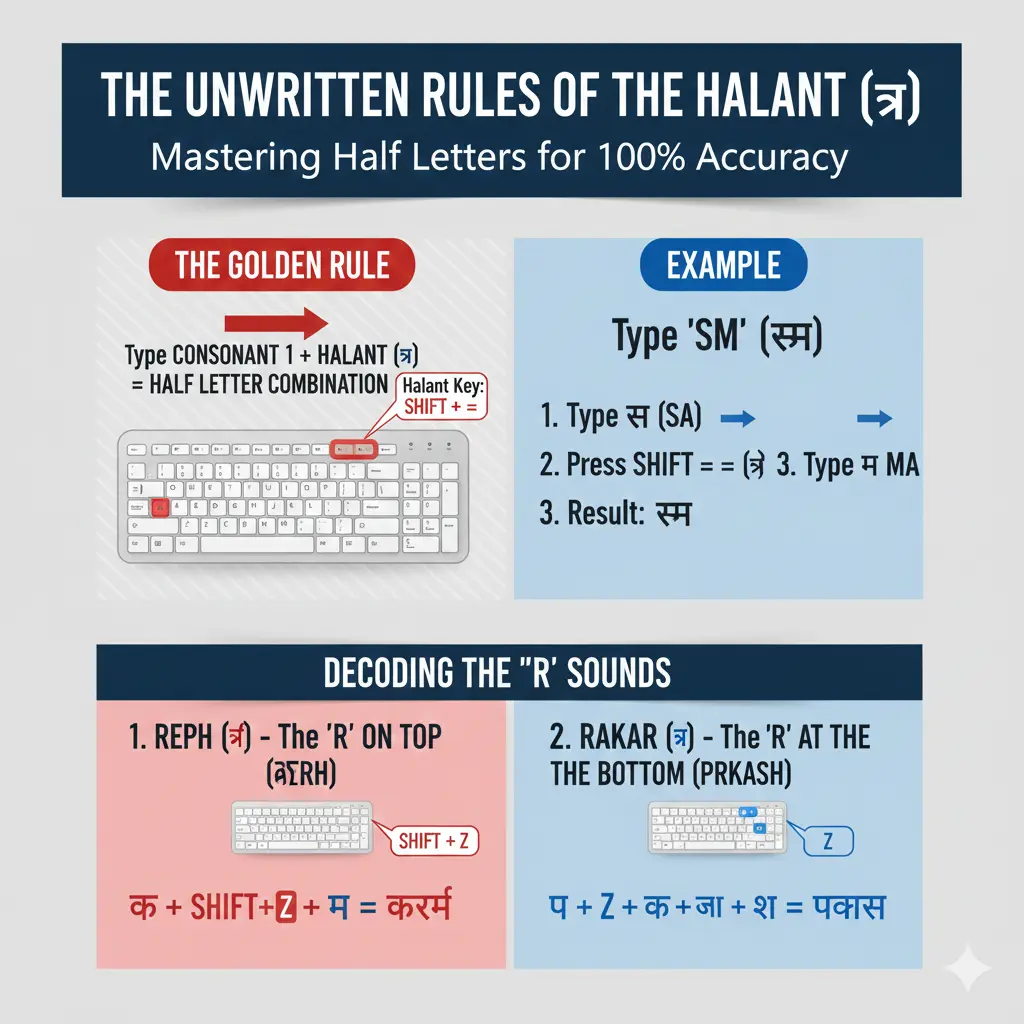
Why the Halant ($्$) is Your Most Important Key in Mangal
In Hindi, many words use “half letters” or “conjuncts” (संयुक्त अक्षर), where two or more consonants blend together without an intervening vowel sound. Think of words like $स्कूल$ (school) or $नमस्ते$ (namaste).
The Halant ($्$) key is your secret weapon for creating these. It’s like a magical ‘mute’ button for a consonant it tells the computer, “Don’t add a vowel sound to this letter; just make it a half-consonant so it can join with the next one.
The Golden Rule: How to Type Any Conjunct ($संयुक्त अक्षर$)
The principle is surprisingly simple, yet incredibly powerful:
Consonant 1 → Halant ($्$) → Consonant 2 → (Optional) Matra/Vowel
This sequence forces the first consonant to become a half letter and join with the second.
Where is the Halant Key?
On most Remington Gail Keyboard layouts, the Halant is found by pressing Shift + = (equals sign).
Let’s look at some examples:
- To type $स्म$ (sma):
- Type स (sa)
- Press Shift + = ($्$)
- Type म (ma)
- Result: $स्म$
- To type $क्त$ (kta):
- Type क (ka)
- Press Shift + = ($्$)
- Type त (ta)
- Result: $क्त$
- To type $ध्य$ (dhya):
- Type ध (dha)
- Press Shift + = ($्$)
- Type य (ya)
- Result: $ध्य$
Decoding the Confusing Forms of 'R' (Reph and Rakar)
The letter ‘R’ ($र$) is a special case in Hindi, as it has multiple forms depending on its position. This is where many beginners get confused, but the Halant principle still applies!
Typing the Reph ($र्$): The 'R' that Sits on Top ($कर्म$)
The Reph ($र्$) is the half ‘r’ sound that appears above the next consonant (e.g., $कर्म, सूर्य$).
Rule: Type the consonant that comes before the Reph, then the Reph, then the consonant that has the Reph.
- Where is the Reph Key? On the Remington layout, the Reph ($र्$) is usually Shift + Z.
- To type $धर्म$ (Dharma):
- Type ध (dha)
- Press Shift + Z ($र्$)
- Type म (ma)
- Result: $धर्म$
- Think: $ध + र् + म = धर्म$
- To type $सूर्य$ (Surya):
- Type स (sa)
- Type ू (oo matra – W with shift)
- Press Shift + Z ($र्$)
- Type य (ya)
- Result: $सूर्य$
- Think: $स + ू + र् + य = सूर्य$
Typing the Rakar ($्र$): The 'R' at the Bottom ($प्रकाश$)
The Reph ($र्$) is the half ‘r’ sound that appears above the next consonant (e.g., $कर्म, सूर्य$).
Rule: Type the consonant that comes before the Reph, then the Reph, then the consonant that has the Reph.
- Where is the Reph Key? On the Remington layout, the Reph ($र्$) is usually Shift + Z.
- To type $धर्म$ (Dharma):
- Type ध (dha)
- Press Shift + Z ($र्$)
- Type म (ma)
- Result: $धर्म$
- Think: $ध + र् + म = धर्म$
- To type $सूर्य$ (Surya):
- Type स (sa)
- Type ू (oo matra – W with shift)
- Press Shift + Z ($र्$)
- Type य (ya)
- Result: $सूर्य$
- Think: $स + ू + र् + य = सूर्य$
Typing the Rakar ($्र$): The 'R' at the Bottom ($प्रकाश$)
The Rakar ($्र$) is the ‘r’ sound that attaches below a consonant (e.g., $प्रकाश, प्रश्न$).
Rule: Type the consonant that will have the Rakar, then the Rakar. This also follows the Halant logic in its backend.
- Where is the Rakar Key? On the Remington layout, the Rakar ($्र$) is usually just the Z key (without Shift).
- To type $प्रकाश$ (Prakāsh):
- Type प (pa)
- Press Z ($्र$)
- Type क (ka)
- Type ा (aa matra – K)
- Type श (sha – ‘ with shift)
- Result: $प्रकाश$
- Think: $प + ् + र + क + आ + श = प्रकाश$ (The ‘Z’ key is a shortcut for Halant+R)
- To type $प्रश्न$ (Prashn):
- Type प (pa)
- Press Z ($्र$)
- Type श (sha)
- Press Shift + = ($्$)
- Type न (na)
- Result: $प्रश्न$
- Think: $प + ् + र + श + ् + न = प्रश्न$
Practice Challenge: 10 Words Built Entirely on the Halant Principle
The best way to master the Halant is through consistent practice. Try typing these common words, focusing on the Halant key ($्$) and the forms of ‘R’.
- $नमस्कार$ (Namaskar)
- $सत्य$ (Satya)
- $कृपया$ (Kripaya)
- $मित्र$ (Mitra)
- $राष्ट्रीय$ (Rashtriya)
- $स्वच्छ$ (Swachchh)
- $विद्यार्थी$ (Vidyarthi)
- $व्यवस्था$ (Vyavastha)
- $कार्यक्रम$ (Karyakram)
- $संस्कृति$ (Sanskriti)
Troubleshooting: Why Your Half Letter Still Looks Whole
If your half letters aren’t appearing correctly, here are the most common culprits:
- Wrong Keyboard Layout: You might be in Inscript or another layout. Double-check your Windows settings to ensure “Hindi Traditional” or “Hindi Remington/Gail” is active.
- Spacebar After Halant: Never press the spacebar between the Halant ($्$) and the next consonant. This will break the combination.
- Accidental Double Halant: Make sure you’re pressing Shift + = only once for each half letter.
- Not Using the Numpad for Alt Codes: While not directly Halant-related, this is a common error for special characters. Remember Alt Codes need the numeric keypad.
Mastering the Halant ($्$) is the single biggest leap you can make in Mangal Font Hindi typing accuracy. Once you understand its logic, a whole new world of complex Hindi words will open up to your fingers. Keep practicing, and you’ll be typing like a pro in no time!
Ready to boost your speed? Head over to our blog on 5 Proven Drills to Increase Your Mangal Font Hindi Typing Speed (Remington)!