Kruti Dev 010 Font Download – Free Hindi Typing Font
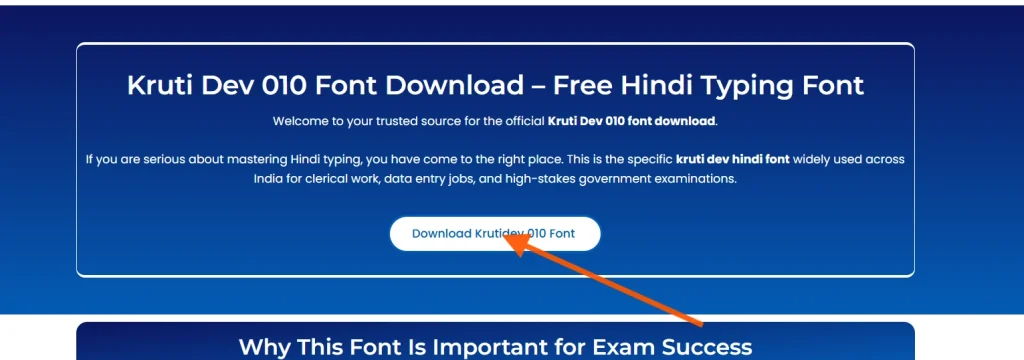
Welcome to your trusted source for the official Kruti Dev 010 font download.
If you are serious about mastering Hindi typing, you have come to the right place. This is the specific kruti dev hindi font widely used across India for clerical work, data entry jobs, and high-stakes government examinations.
Follow these simple steps to install the Krutidev 010 font on your computer:
Step 1: Download the Font File
Click the download button and save the KrutiDev010.ttf file on your computer.
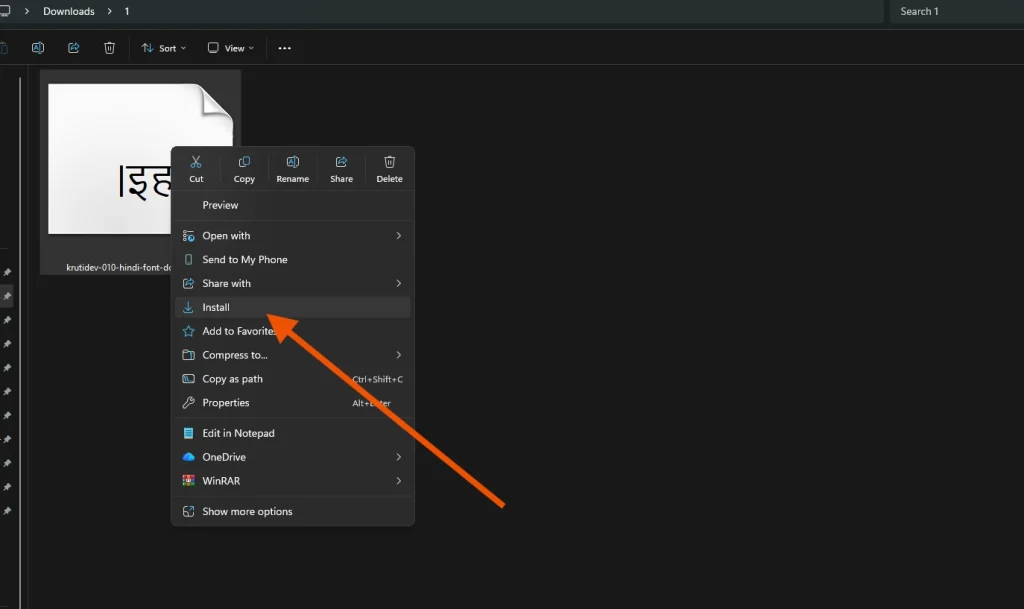
Step 2: Install the Font
Locate the downloaded KrutiDev010.ttf file Right-click on the file Click on Install
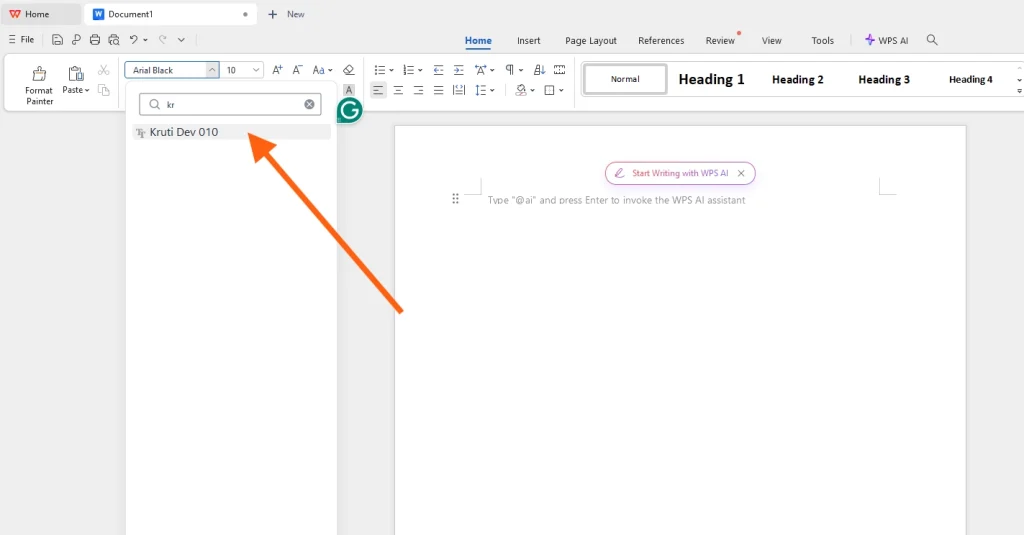
Step 3: Start Using the Font
Open MS Word, Notepad, or any typing software Go to the font list Select Krutidev 010 Start typing
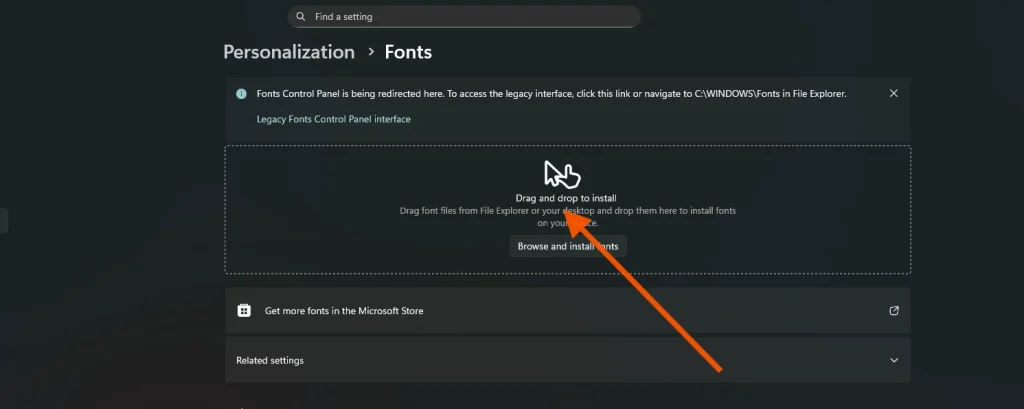
Alternative Method (Control Panel Method)
- Copy the KrutiDev010.ttf file
- Go to Control Panel
- Click on Fonts
- Paste the font file inside the Fonts folder
- The font will be installed automatically
Why This Font Is Important for Exam Success
If you are preparing for government jobs, using the correct tool is half the battle. Many official exams strictly require candidates to type using the kruti dev 010 keyboard layout.
Practicing with a different font can lead to muscle memory mistakes. By downloading and installing this specific version, you ensure that your home practice setup matches the exact keyboard environment you will face in the exam hall.
Trusted by Aspirants for Major Exams
Kruti Dev 010 is the standard for typing tests conducted by major government bodies, including:
- SSC (Staff Selection Commission)
- UPSSSC (Uttar Pradesh Subordinate Services Selection Commission)
- MP Professional Examination Board (Vyapam)
- Various High Court and Civil Court recruitment exams.
Safe, Verified, and Ready for Office
The download link provided below contains the verified Kruti Dev 010 TrueType font file. It is 100% safe, virus-free, and fully compatible with Microsoft Word, Excel, and other professional printing tools. Whether you are learning the Krutidev Keyboard layout for the first time or polishing your speed, this file is the foundation you need.
Why Kruti Dev 010 Is the Standard Version
Every font family has a “parent” version. For this kruti dev hindi font, 010 is that parent. It is the “Regular” version with standard spacing and clear shapes, making it the easiest to read on a computer screen.
Here is a quick breakdown of why you should stick to 010 and avoid the others for practice:
| Version | Style Name | Description | Exam Suitability |
|---|---|---|---|
Kruti Dev 010 |
Regular |
Standard spacing and width. Clear and easy to read. |
Highly Recommended |
Kruti Dev 011 |
Condensed |
Letters are squashed closer together (narrow). Used to save space on paper. |
Avoid (Hard to read) |
Kruti Dev 021 |
Bold |
Thicker letters used for Headings. |
Avoid for Paragraphs |
Kruti Dev 014 |
Italic |
Slanted letters used for emphasis. |
Rarely Used |
Pros and Cons of Kruti Dev 010 Font
Pros
- Widely Used in Government Exams
- Familiar Typing Layout
- Reliable for Offline Typing
- Accepted by Training Institutes
Cons
- Not Suitable for Online Use
- No Spell Check Suppo
- Desktop-Only Use
- Old Font System
Kruti Dev 010 vs Unicode Fonts (Detailed Comparison)
| Aspect | Kruti Dev 010 | Unicode Fonts (Mangal & Others) |
|---|---|---|
Font Type |
Legacy Hindi font |
Modern Hindi font system |
Encoding Method |
Non-Unicode (ANSI based) |
Unicode standard |
How Text Is Stored |
Saved as English symbols with Hindi shapes |
Saved as real Hindi characters |
Online Compatibility |
Not compatible |
Fully compatible |
Copy–Paste Behavior |
Text breaks outside the system |
Text works everywhere |
Mobile Support |
Not supported |
Fully supported |
Web & App Use |
Not suitable |
Designed for web and apps |
Spell Check |
Not available |
Available |
Search Engine Reading |
Not readable |
Fully readable |
Installation Requirement |
Must be installed on system |
No special install needed |
Exam Usage |
Widely used in typing exams |
Rarely used in exams |
Printing Use |
Common in older systems |
Used in modern publishing |
Best Environment |
Offline typing practice |
Online and offline use |
Learning Curve |
Requires memorizing layout |
Easier for general users |
Long-Term Use |
Limited to legacy needs |
Future-proof |
Using Your Text Beyond the Exam
While Kruti Dev 010 is the absolute best choice for typing practice and government exams, it has one major rule: keep it offline.
If you try to copy your typed text and paste it directly into an email, WhatsApp, or Facebook, it will break. You won’t see Hindi; you will see a mess of random English characters. This happens because the internet doesn’t understand this legacy system.
The Simple Fix: If you need to use your typed content online, don’t retype it! Simply use krutidev to unicode converter. This tool instantly transforms your practice text into modern Hindi that works perfectly on all websites, mobile apps, and digital platforms.
FAQs About KrutiDev 010
Is this font used in government exams?
Yes. Exams like SSC, UPSSSC, and MP Vyapam use the kruti 10 keyboard layout. Practicing with this specific font is essential for success.
Where is the key map for this font?
Since the keys aren’t printed on standard keyboards, you need a reference. Download our Krutidev Keyboard layout to see where each Hindi character is placed.
Why does it type in English?
You must select “Kruti Dev 010” from the font dropdown menu in your software. If you don’t, the computer will just type standard English letters.
Can I use Kruti Dev 011 or 016 instead of 010?
Kruti Dev 010 is the standard “Regular” version used in exams. Version 011 is “Condensed” (narrow). Always practice with the kruti dev hindi typing keyboard (010) to match exam conditions.
Can I use this on my mobile?
No. This is a desktop-only font. To read or share Hindi text on mobile, you must use our krutidev to unicode converter to fix the encoding.