
Mangal Font Download – Official Unicode Hindi & Marathi Font
Have you ever created a Hindi document, sent it to a colleague, and heard back that the text looks like "garbage" or broken symbols on their screen? This is a common frustration, but the solution is simple.
The problem usually happens because legacy fonts don't work the same way on every device. To fix this, you need the mangal unicode font, the official standard for modern Indian language typing.
Step#1
Extract the files
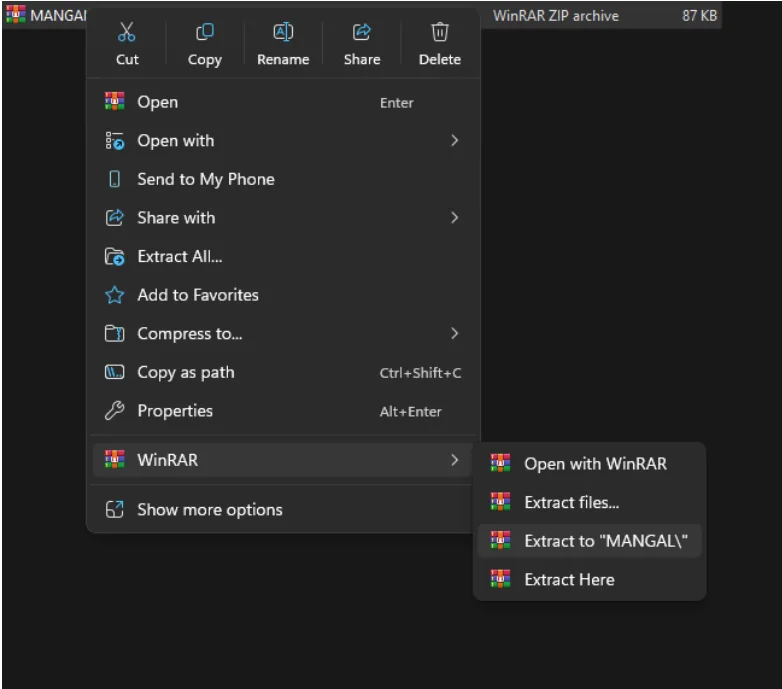
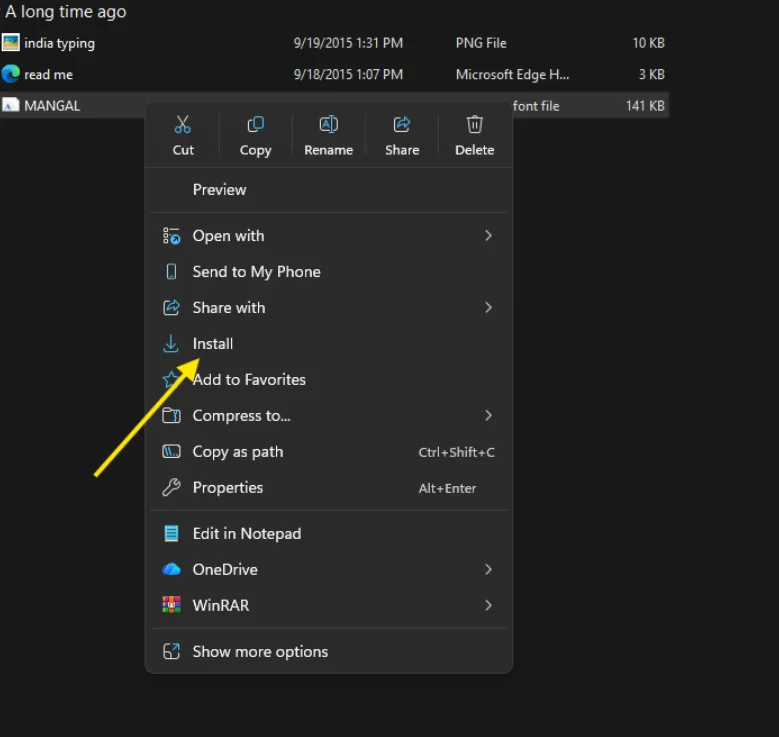
Step#2
press the right click and Install the font
Quick Setup for Typing Layouts (Windows 10/11)
Once the Hindi/Marathi language pack is installed, enabling the layout is fast:
- Go back to Settings > Time & Language > Language.
- Click on your installed language (e.g., Hindi).
- Select Options and then Add a keyboard.
- Select your preferred layout: Hindi Inscript (the official standard) or Hindi Traditional (often the Remington Gail variation).
- Start Typing: Use the easy shortcut Windows Key + Spacebar to switch back and forth between English and your new Mangal keyboard instantly!
Your Success Starts Now: Get Your Mangal Font Working!
You now have the complete, easy-to-read guide to not only get the mangal unicode font but also to configure it for compliance, perfect compatibility, and high performance.
Stop worrying about broken text and rejected forms. Secure your professional communication today by using the official Mangal font download and the correct input method. If you want to download the Krutidev font, click here
Final Action: Take the simple steps outlined above, choose the Mangal Keyboard layout, and start typing with confidence.
The Universal Standard for Hindi & Marathi
Mangal is an OpenType Unicode font designed specifically for Hindi, Marathi, Sanskrit, and Nepali. Unlike older legacy fonts such as the Krutidev 010 Font download, Mangal ensures that your text is saved in a universal language that computers understand everywhere.
When you use a mangal hindi font download, your text opens correctly on:
- Government websites and university portals.
- Emails and PDF documents.
- Mobile phones (Android & iPhone) and tablets.
Safe & Verified Download
This page provides a safe, verified, and mangal font free download link. We ensure the file is clean and ready for professional use. Whether you are typing a thesis in Marathi (using the mangal marathi font download) or preparing for a central government exam, this file is the essential starting point.
Working with Old Documents?
If you still have older documents typed in legacy formats, you don’t need to retype them. Simply converting them using a krutidev to unicode tool allows you to transform that old text into clean Mangal Unicode, making it ready for modern online work and official submissions.
Why Mangal Is the Right Font for Hindi and Marathi
Choosing the Mangal Unicode font is not just about appearance. It is about making sure your text works properly and is accepted wherever it is used.
Accepted by Official Systems
Indian government offices, courts, and many official portals widely use Mangal. Documents prepared in Unicode format are more likely to be accepted without issues. Using the correct font helps avoid rejection or formatting problems, especially in formal or academic work.
Built for Long-Term Use
Older fonts such as KrutiDev rely on outdated technology and often fail when text is copied or shared. Mangal uses the Unicode standard, which keeps your text stable even when it is moved between systems, emails, or documents. This makes it a safer choice for long-term and professional use.
Works Everywhere Without Problems
Because Mangal follows global Unicode rules, your text does not break or change when opened on different devices. It displays correctly on Windows, Mac, Android, and mobile phones without showing boxes or strange characters.
Reliable for Data and Professional Work
Unicode fonts like Mangal store text in a clean and searchable format. This is important when working with documents, lists, forms, or databases where accuracy matters.
Works Seamlessly on All Major Operating Systems
One of the biggest reasons to choose a mangal font free download is compatibility. Unlike older fonts that require the receiver to have the exact same file installed, Mangal works natively across almost every digital environment.
Mangal is deeply integrated into the Windows ecosystem. It works flawlessly with Microsoft Word, Excel, PowerPoint, and Outlook right out of the box. While it is often pre-installed, downloading the specific font file ensures you have the correct version if your system is missing it or if you are setting up a clean install.
Documents created using this mangal unicode font open correctly on Mac computers, iPhones, and iPads. You generally do not need to install third-party tools; simply enabling the Hindi or Marathi language support on your Apple device allows you to read and edit these files instantly.
For developers and academic researchers, Mangal is widely supported by Linux distributions and open-source office suites (like LibreOffice). This universal support makes it the preferred Hindi font style download for technical environments where proprietary software might not be used.
Compatible with Web and Professional Tools
Beyond just operating systems, the mangal unicode font is the backbone of the modern Indian web. It ensures your content survives the journey from your computer to the world.
Web Browsers & Online Platforms
Text written in Mangal displays correctly in all major browsers, including Google Chrome, Mozilla Firefox, Safari, and Microsoft Edge. This makes it the only viable choice for:
- Building Websites and Blogs
- Sending professional Emails (Gmail/Outlook)
- Filling out Online Government Forms
- Posting on Social Media.
Unlike legacy fonts that turn into “junk text” online Mangal renders perfectly every time.
Professional & Academic Software
For those in data entry or research, Mangal integrates seamlessly with:
- PDF Tools: Adobe Acrobat and other readers display the text without font substitution errors
- Database Systems: SQL and Excel databases store Unicode text accurately, preventing data corruption.
- Design Software: Modern versions of Photoshop and InDesign support Unicode, making this a versatile hindi font style download for publishers.
Using a font that works everywhere saves time and avoids technical headaches. With Mangal, you can focus on your work instead of worrying about whether your text will look like square boxes on someone else’s screen.
Frequently Asked Questions (FAQs)
What is the difference between Inscript and Remington Gail?
Inscript and Remington are keyboard layouts.
Inscript: The standard Windows layout.
Remington Gail: Mimics the old typewriter style (like Kruti Dev) but outputs Unicode.
Can I use this converter on a mobile device?
Yes. The converter works on mobile phones, tablets, and desktop computers. You can use it in any modern browser.
Is this download free?
Yes. This mangal hindi font free download is virus-free and completely free for personal and professional use.
Can I convert Kruti Dev text to Mangal?
Yes. If you have old files in Kruti Dev, use our krutidev to unicode converter. It instantly transforms legacy text into Mangal so it works on all devices.
Why do I still see English after installing Mangal?
You must change your Input Language. Press Win + Spacebar on Windows to switch to Hindi. Unlike old fonts, Mangal requires the system language to be set to Hindi.