
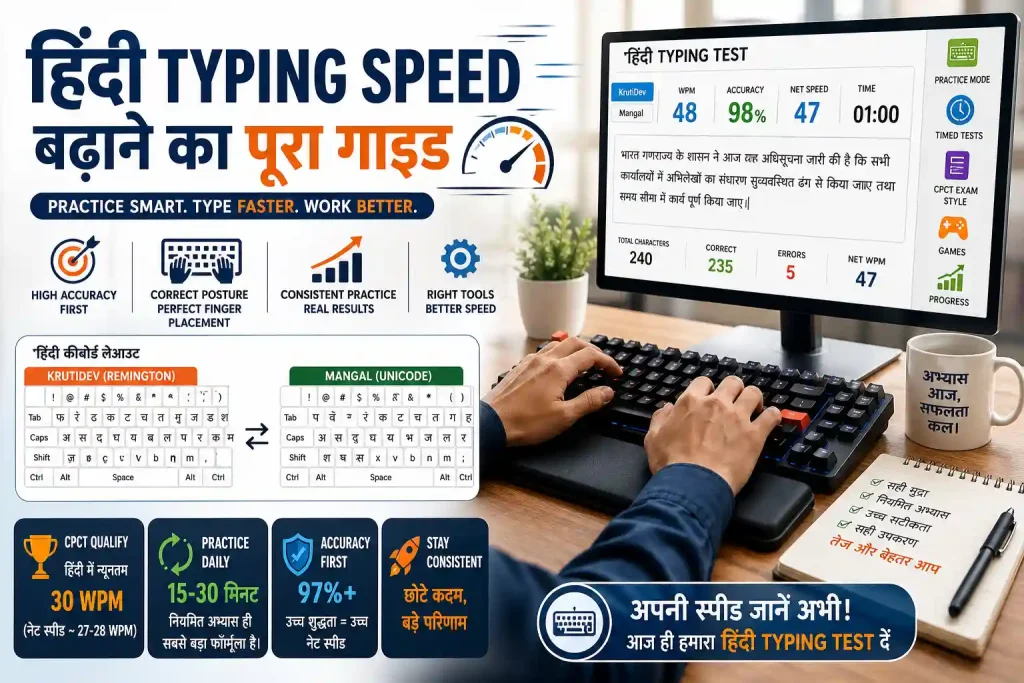
Typing speed is not a gift. It is a skill built through deliberate practice, correct posture, and the right tools. Whether you are preparing for the CPCT exam, working as a government typist, or simply want to stop losing hours to slow keyboard work, this guide covers everything you need to know without filler.
This guide is written specifically for typists who work in both Hindi and English. If you are switching between KrutiDev to Unicode workflows, handling government documents, or sitting for state-level typing exams, the advice here goes beyond generic tutorials. We cover the mechanics, the mindset, the practice schedule, and the common mistakes that silently keep your WPM stuck.
What “Typing Speed” Actually Means (and What It Doesn’t)
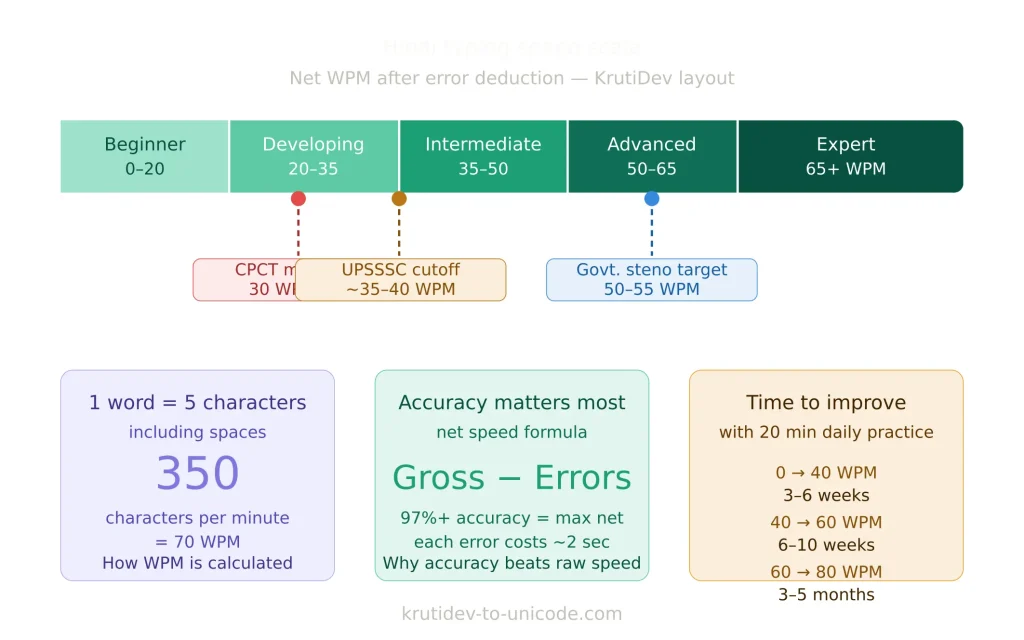
Words per minute (WPM) is the standard measure of typing speed. One “word” in a typing test equals five characters, including spaces. So typing 350 characters in one minute = 70 WPM.
But raw WPM without accuracy is meaningless. A typist who hits 80 WPM with 85% accuracy is slower in real-world output than a typist who types 60 WPM at 99% accuracy — because the first person spends time correcting errors. For CPCT and most government exams, your net speed (adjusted for errors) is what gets scored, not your gross WPM.
So the real goal is: high accuracy first, then speed. This one principle explains most of the advice below.
The Baseline: Know Where You Stand Right Now
Before improving, measure your current speed. Take a 1-minute typing test and note:
- Gross WPM (raw speed)
- Accuracy percentage
- Which keys or character sequences you slow down on
For Hindi typists, also test your KrutiDev speed separately from Unicode/Mangal. Most typists find they perform differently depending on keyboard layout and font system. If you frequently convert documents using a KrutiDev to Unicode converter, your KrutiDev muscle memory may actually be stronger than your Unicode typing which is worth knowing before you design a practice routine.
The quickest way to get an honest baseline in Hindi is to take a timed test right now. Our online Hindi typing test supports both KrutiDev and Mangal (Unicode) layouts and gives you your WPM, accuracy, correct characters, error count, and net speed in one result. Run it once on KrutiDev and once on Mangal the comparison will immediately tell you which layout is your stronger base to build from.
Target benchmarks to aim for:
| Level | English WPM | Hindi WPM (KrutiDev) | Use Case |
| Beginner | 20–35 | 15–25 | Learning phase |
| Average | 40–55 | 30–40 | General office work |
| Proficient | 60–75 | 45–55 | CPCT qualifying range |
| Advanced | 80–100+ | 60–70+ | Data entry, court stenography |
CPCT (Computer Proficiency Certification Test) in Madhya Pradesh requires a minimum of 30 WPM in Hindi typing. The actual qualifying net speed, after error deduction, sits around 27–28 WPM. That sounds easy until you factor in exam pressure and the specific KrutiDev passages used in the test.
Step 1 – Master the Home Row Before Anything Else
The single most impactful change you can make is switching to proper touch typing using all ten fingers without looking at the keyboard. This is not optional if you want to go past 50 WPM sustainably.
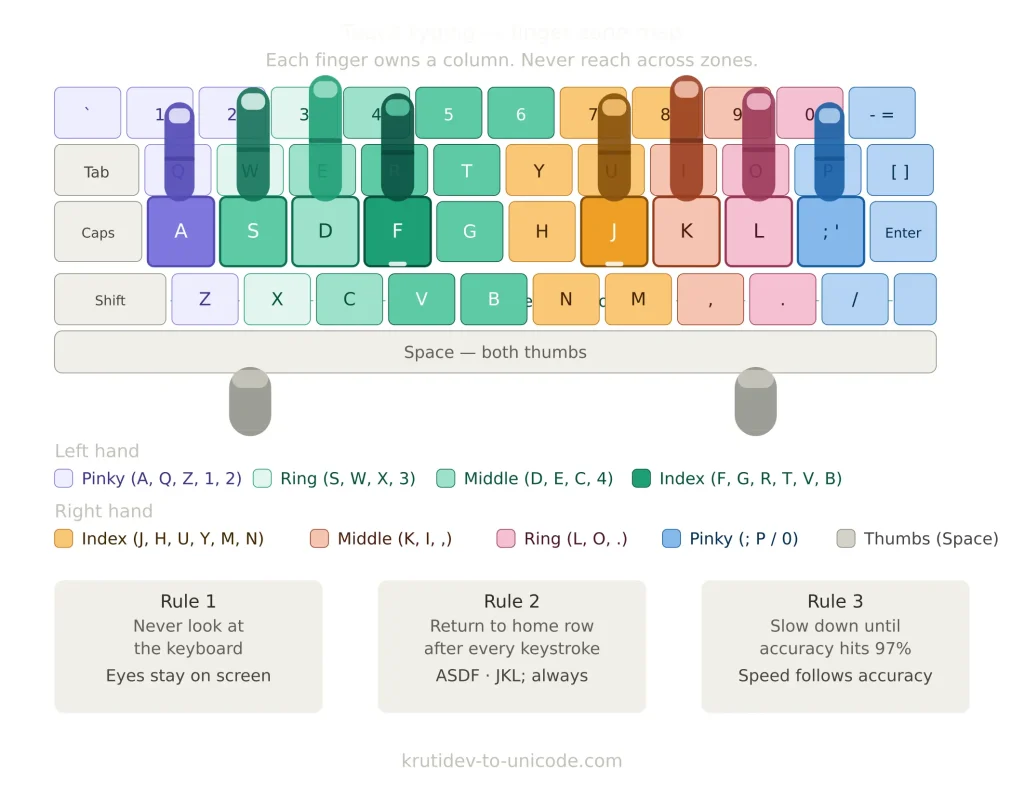
The home row is your anchor:
- Left hand: A, S, D, F (index on F)
- Right hand: J, K, L, ; (index on J)
- Thumbs: rest on the space bar
Every finger is responsible for a specific zone of keys. The index fingers handle the most keys (including the central columns), while the pinkies handle the outer keys. Learning this map and committing to it even when it feels slow at first is the foundation.
For KrutiDev typists, the same principle applies, but mapped to the Remington Devanagari layout. The KrutiDev keyboard was designed to mirror the original Remington typewriter layout used in government offices across North India. If you trained on a physical Remington machine, your finger positions are already partially correct you just need to reinforce them on a modern keyboard without looking down.
Practice tip: Put a cloth or tape over your keyboard. Type slowly for the first two weeks. The short-term discomfort is worth months of speed gains later.
Step 2 – Accuracy Before Speed (This Is Non-Negotiable)
Every typing coach says this, but most learners ignore it. Here is why it matters mathematically:
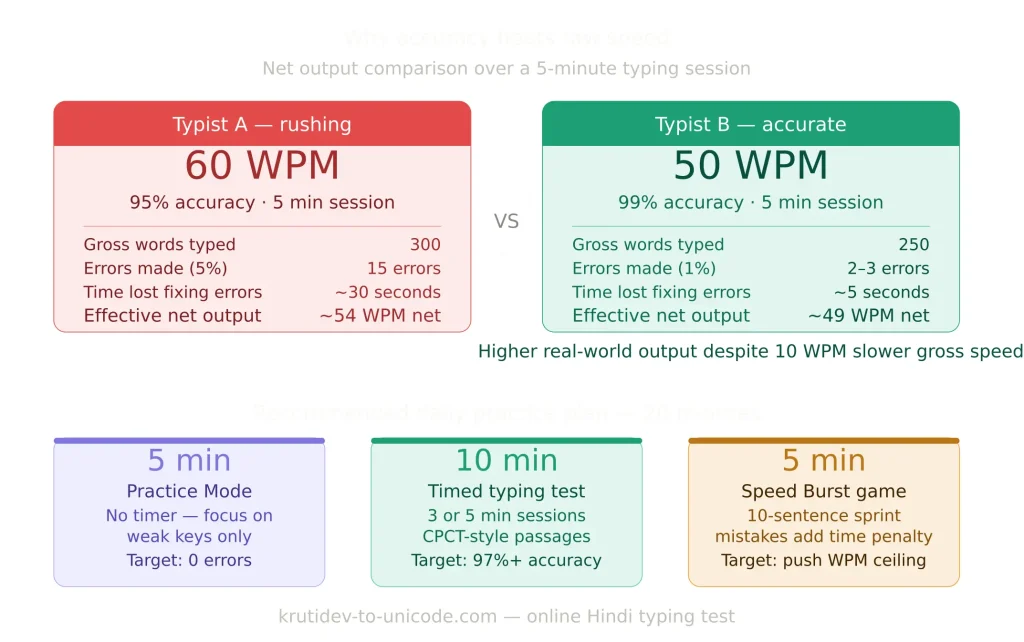
If you type 60 WPM with 95% accuracy over 5 minutes (300 words), you make roughly 15 errors. Correcting each error costs you about 2 seconds. That is 30 seconds of backspacing equivalent to losing 6 WPM off your net score. A typist at 50 WPM with 99% accuracy (3 errors) loses just 6 seconds their effective output is significantly higher.
The practical rule: if you are making more than 2 errors per minute, slow down. Reduce your speed by 20% until your accuracy stabilizes above 97%, then gradually push the pace back up.
For CPCT Hindi typing, error deduction is strict. Each wrong character reduces your net word count. Practicing at 90% accuracy and hoping to “fix it in the exam” does not work your error patterns are muscle memory by that point.
Step 3 – Targeted Drills, Not Random Text
General typing practice copying random paragraphs is useful but inefficient. What improves speed faster is targeted drilling of your weak areas.
How to identify weak keys
Most online typing tools (Keybr, Monkeytype) show you a per-key breakdown of your error rate and average time. Look for keys where you consistently slow down or error. Common problem zones for Hindi typists switching between KrutiDev and Unicode include:
- Half-characters and conjunct consonants (क्ष, त्र, ज्ञ)
- Matras that use non-obvious key positions (ि, ी, ु, ू)
- Shift-key combinations for upper-row characters
- Punctuation and numerals (often neglected during practice)
Drill structure that actually works
Spend the first 5 minutes of every practice session drilling only your three weakest key sequences. Type each sequence 20–30 times in a row, slowly and accurately. This focused repetition rewires muscle memory faster than general practice. Spend the remaining 10–20 minutes on full-text typing to build flow and context-switching speed.
Step 4 – Build a Consistent Practice Schedule
Frequency matters more than duration. Typing 15 minutes every day outperforms a 2-hour session once a week because skill retention in motor learning depends on repetition over time, not volume in one sitting.
A practical 4-week structure:
Week 1–2: Foundation
- 15 minutes daily
- Focus entirely on home row and correct finger positioning
- Target: zero errors, even at 20 WPM
- Do not check your WPM yet it will discourage you for the wrong reasons
Week 3–4: Expansion
- 20–25 minutes daily
- Begin full-keyboard coverage with structured lessons
- Start tracking WPM weekly (not daily day-to-day variance is noise)
- Introduce real-world text: government document samples, CPCT practice passages
- Use the Practice Mode in our online Hindi typing test to type without a timer focus only on accuracy at this stage
Month 2 onward: Speed building
- 30 minutes daily
- Add 1-minute speed bursts type as fast as possible for 60 seconds, then slow back down for normal practice. The Speed Burst game in our Hindi typing test is designed exactly for this it runs you through 10 sentences and penalises mistakes with time, training both speed and accuracy under pressure
- Use timed tests every 7–10 days to track progress
- Introduce varied content: different document formats, technical vocabulary, mixed Hindi-English passages
Most typists see their first meaningful speed jump (10–15 WPM improvement) within 3–6 weeks of this structured approach. The plateau between 60 and 80 WPM is the hardest it typically requires 2–3 months of consistent work to break through.
Step 5 – Fix Your Physical Setup
Physical ergonomics directly affect typing speed and accuracy. Poor posture causes muscle fatigue that degrades your performance within 20–30 minutes meaning your practice sessions get less effective over time, not more.
Chair and desk height: Your elbows should be at roughly 90 degrees when your hands rest on the keyboard. If you are reaching up or hunching down, your arms tense, and tension slows your fingers.
Wrist position: Wrists should float slightly above the keyboard, not rest on the desk while typing. Resting wrists cause ulnar deviation (bending the wrist sideways), which restricts finger movement range. Use a wrist rest only during breaks, not while actively typing.
Monitor height: Top of the screen should be at or slightly below eye level. Craning your neck upward causes shoulder tension that migrates down to your arms and hands.
Keyboard choice: A mechanical keyboard with tactile or linear switches gives you physical feedback that helps reinforce keystroke registration. You stop pressing keys harder than necessary, which reduces finger fatigue. This is especially relevant for Hindi typists who use shift-heavy KrutiDev layouts with many two-key character combinations.
Step 6 – Use the Right Tools for Hindi Typing Practice
Most global typing platforms (TypingClub, Keybr, 10FastFingers) focus on English. Hindi typists need tools that support Devanagari script and ideally the KrutiDev keyboard layout.
Useful resources:
- CPCT practice portals: The official CPCT platform releases sample passages in KrutiDev. Practice on these specifically, because the character distribution in exam passages differs from general Hindi text.
- Dedicated Hindi typing test: Our online Hindi typing test is built specifically for KrutiDev and Mangal typists. It includes timed tests from 1 to 30 minutes, a pressure-free Practice Mode with no timer, three typing games (Word Catch, Sentence Scramble, and Speed Burst), CPCT Exam Style passages, Government vocabulary passages, and a progress dashboard that tracks your WPM and accuracy across sessions. Unlike generic English typing tools, every passage here is in Devanagari script, and you can switch between KrutiDev and Mangal layouts at any point without reloading the page.
- Font conversion tools: If your workflow involves producing documents in both KrutiDev and Unicode Devanagari, a reliable KrutiDev to Unicode converter eliminates the manual re-typing that wastes time and introduces errors. Accurate conversion means you can type in whichever layout you are fastest in, then convert instead of forcing yourself to type slowly in an unfamiliar layout.
Why layout familiarity matters more than layout “correctness”
There is no universally “better” keyboard layout for Hindi. KrutiDev (Remington) and Inscript both have their advocates. What matters is consistency pick one layout and practice it exclusively until it is automatic. Switching between layouts, even occasionally, creates interference patterns in muscle memory that slow you down in both.
Step 7 Common Mistakes That Silently Kill Your Speed
Looking at the keyboard
Every glance down breaks your reading flow, costs you 0.5–1 second of lag, and reinforces a habit that caps your speed permanently. If you need to look down right now, it means your finger-to-key mapping is not yet automatic. The solution is more drilling of specific keys, not more general practice.
Rushing before accuracy is stable
Trying to type fast before your accuracy is above 97% means you are practicing making errors and errors become muscle memory too. Speed emerges naturally once accuracy is solid. Forcing it before then creates ceiling effects that are very hard to undo.
Practicing only easy text
Typing the same simple words over and over feels good because your WPM number looks higher. But it does not build real-world speed. Deliberately practice text that includes uncommon characters, punctuation, numbers, and mixed-case words. For KrutiDev typists, regularly practice conjunct consonants and complex matra combinations these are where most exam time is lost.
Inconsistent hand position
Drifting your hands away from the home row during typing even slightly accumulates into hundreds of small positional errors per session. Each one requires your fingers to recalculate distance to the target key, adding milliseconds of lag. Keeping your hands anchored reduces cognitive overhead and lets speed increase naturally.
Not tracking progress
Without measurement, you cannot distinguish plateaus from regression. Take a standardised 1-minute test every 7–10 days, record the result, and review your trend monthly. If you plateau for more than 3 weeks, change your drill type or increase the difficulty of your practice text your current practice has been fully absorbed.
Special Considerations for CPCT and Government Typing Exams
The CPCT Hindi typing test is structured differently from a typical typing speed test. Here is what matters specifically:
- Passage familiarity: CPCT passages are drawn from Hindi literature, government circulars, and administrative text. The vocabulary skews formal and less common than everyday Hindi. Practice with similar source material not Bollywood dialogue or social media text.
- Error weighting: In most CPCT scoring models, each error reduces your word count. A net speed below the cutoff disqualifies you regardless of your gross WPM. Practicing at 98%+ accuracy is the correct target not simply “getting faster.”
- Time pressure: Most candidates who fail do so because they type differently under exam conditions. Add timed tests to your practice at least 3 times a week, starting from month 2. This trains your nervous system to operate at exam speed without the psychological contraction that causes errors. Use the Hindi typing test in 3-minute and 5-minute timed modes to simulate real exam pacing these durations match the pressure window where most candidates make their worst errors.
- KrutiDev 010 specifically: The CPCT uses KrutiDev 010 as the standard font. Practice exclusively on KrutiDev 010, not other variants of the Kruti Dev family. Different versions have slightly different character mappings, and any mismatch will introduce unexpected errors in exam conditions.
How Long Will It Take?
Honest timeline estimates, assuming 20–30 minutes of focused daily practice:
- 0 to 40 WPM: 3–6 weeks (faster if you already type regularly)
- 40 to 60 WPM: 6–10 weeks
- 60 to 80 WPM: 3–5 months
- 80 WPM+: 6–12 months of sustained practice
These are realistic estimates, not marketing promises. Most people improve faster than they expect in the first month, then hit a plateau at 50–60 WPM that requires a deliberate change in practice method to push through. If you are stuck, it is almost always one of three things: looking at the keyboard, inconsistent hand position, or not practicing difficult enough text.
Final Word
Typing speed compounds. A typist who gains 20 WPM over six months does not just work 33% faster they think more fluidly because the gap between thought and output shrinks. Less cognitive bandwidth goes to the mechanical act of typing, and more is available for the work itself.
For Hindi typists, the workflow matters as much as raw speed. If you are spending time re-typing documents because of font compatibility issues between legacy KrutiDev and modern Unicode systems, that time loss adds up. Using a proper KrutiDev to Unicode converter removes that friction entirely, letting you focus your practice on speed rather than format management.
Start with where you are. Measure it honestly take the Hindi typing test right now if you have not already. Drill your weak spots, protect your accuracy, and add speed only when your fingers can hold it without error. The WPM will follow.
